Version 3.0.0
We’re excited to introduce Version 3.0.0, one of our biggest updates yet — bringing Discounts, Multiple Outlets, Dual-Screen Customer Display, Live Order Status Display, Bulk Menu Import/Export, a redesigned Mobile POS, Customer Insights, Push Notifications, Cloud Image Upload (S3/R2), Google Authentication, Table Assignments, AI-Powered Menu Images, and Fully Customizable Dashboards to RestroPro SaaS.
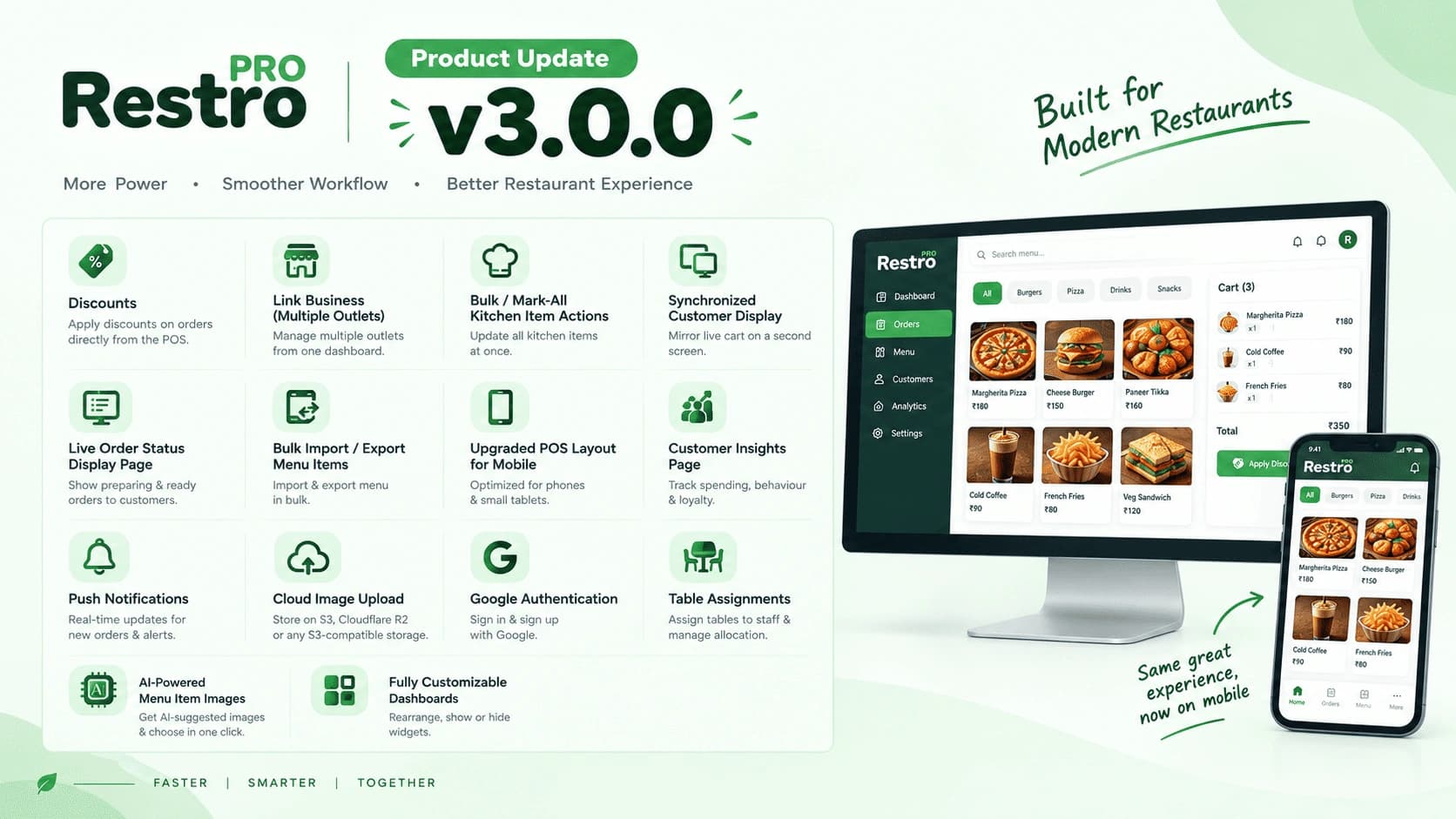
v3.0.0 (Release Date)
- ✅ Discounts – Create and apply discounts on orders directly from the POS
- ✅ Link Business (Multiple Outlets) – Link multiple outlets under a single account and switch between them from one dashboard
- ✅ Bulk / Mark-All Kitchen Item Actions – Update the status of all kitchen items at once instead of marking them one by one
- ✅ Synchronized Customer Display (Dual-Screen) – Mirror the live cart on a second screen so customers can follow the order as it is being built
- ✅ Live Order Status Display Page – A dedicated public screen showing preparing and ready orders for customers
- ✅ Bulk Import / Export Menu Items – Import and export your entire menu in bulk for faster setup and migration
- ✅ Upgraded POS Layout for Mobile – Redesigned POS screen optimized for phones and small tablets
- ✅ Customer Insights Page – New page with customer spending, ordering behaviour, and loyalty insights
- ✅ Push Notifications – Real-time push notifications for new orders and important updates
- ✅ Cloud Image Upload – Store images on S3, Cloudflare R2, or any S3-compatible storage provider
- ✅ Google Authentication – Sign in and sign up with a Google account
- ✅ Table Assignments – Assign tables to staff members and manage table allocation
- ✅ AI-Powered Menu Item Images – Get AI-suggested images for menu items and pick the one you want in a click
- ✅ Fully Customizable Dashboards – Rearrange, show, or hide dashboard widgets to build the view you need
Update Guide
Step 1: Update Database
-- ============================================================
-- 1. Discounts + Invoice Void/Audit
-- ============================================================
ALTER TABLE invoices
  ADD COLUMN discount_type ENUM('fixed','percentage') DEFAULT NULL AFTER service_charge_total,
  ADD COLUMN discount_value DECIMAL(10,2) DEFAULT '0.00' AFTER discount_type,
  ADD COLUMN discount_total DECIMAL(10,2) DEFAULT '0.00' AFTER discount_value,
  ADD COLUMN status ENUM('COMPLETED','VOID') NOT NULL DEFAULT 'COMPLETED' AFTER created_by,
  ADD COLUMN voided_at DATETIME DEFAULT NULL AFTER status,
  ADD COLUMN voided_by VARCHAR(255) DEFAULT NULL AFTER voided_at,
  ADD COLUMN void_reason VARCHAR(500) DEFAULT NULL AFTER voided_by,
  ADD KEY invoices_voided_by_idx (voided_by),
  ADD KEY invoices_tenant_status_idx (tenant_id, status),
  ADD CONSTRAINT invoices_voided_by_fk
    FOREIGN KEY (voided_by) REFERENCES users (username)
    ON DELETE SET NULL ON UPDATE CASCADE;

CREATE TABLE IF NOT EXISTS invoice_audit_log (
  id INT AUTO_INCREMENT PRIMARY KEY,
  tenant_id INT NOT NULL,
  invoice_id INT NOT NULL,
  invoice_number INT NOT NULL,
  action ENUM('VOID') NOT NULL,
  performed_by VARCHAR(255) DEFAULT NULL,
  reason VARCHAR(500) NOT NULL,
  previous_status VARCHAR(20) NOT NULL,
  new_status VARCHAR(20) NOT NULL,
  created_at TIMESTAMP DEFAULT CURRENT_TIMESTAMP,
  KEY invoice_audit_log_tenant_invoice_idx (tenant_id, invoice_id),
  KEY invoice_audit_log_invoice_fk (invoice_id, tenant_id),
  KEY invoice_audit_log_performed_by_fk (performed_by),
  CONSTRAINT invoice_audit_log_invoice_fk
    FOREIGN KEY (invoice_id, tenant_id) REFERENCES invoices (id, tenant_id)
    ON DELETE CASCADE ON UPDATE CASCADE,
  CONSTRAINT invoice_audit_log_performed_by_fk
    FOREIGN KEY (performed_by) REFERENCES users (username)
    ON DELETE SET NULL ON UPDATE CASCADE
) ENGINE=InnoDB DEFAULT CHARSET=utf8mb4;

-- ============================================================
-- 2. Link Business (Multiple Outlets)
-- ============================================================
CREATE TABLE IF NOT EXISTS business_groups (
  id INT AUTO_INCREMENT PRIMARY KEY,
  name VARCHAR(100) NOT NULL,
  description VARCHAR(500) DEFAULT NULL,
  created_by VARCHAR(255) DEFAULT NULL,
  created_at TIMESTAMP DEFAULT CURRENT_TIMESTAMP,
  updated_at TIMESTAMP DEFAULT CURRENT_TIMESTAMP ON UPDATE CURRENT_TIMESTAMP,
  UNIQUE KEY business_groups_name_unique (name)
) ENGINE=InnoDB DEFAULT CHARSET=utf8mb4;

ALTER TABLE tenants
  ADD COLUMN business_group_id INT DEFAULT NULL AFTER stripe_next_price_id,
  ADD KEY tenants_business_group_id (business_group_id),
  ADD CONSTRAINT tenants_business_group_id_fk
    FOREIGN KEY (business_group_id) REFERENCES business_groups (id)
    ON DELETE SET NULL ON UPDATE CASCADE;

-- ============================================================
-- 3. Google Authentication + per-tenant user status/switching
--    (also backs Link Business: users can belong to a group)
-- ============================================================
ALTER TABLE users
  MODIFY COLUMN role ENUM('admin','user','group_owner') DEFAULT 'user',
  ADD COLUMN business_group_id INT DEFAULT NULL AFTER tenant_id,
  ADD COLUMN group_permission_level ENUM('read','write') DEFAULT NULL AFTER business_group_id,
  ADD COLUMN status ENUM('active','inactive') NOT NULL DEFAULT 'active' AFTER group_permission_level,
  ADD COLUMN active_tenant_id INT DEFAULT NULL AFTER status,
  ADD COLUMN firebase_uid VARCHAR(128) DEFAULT NULL AFTER active_tenant_id,
  ADD COLUMN signup_provider VARCHAR(20) DEFAULT 'email' AFTER firebase_uid,
  ADD UNIQUE KEY firebase_uid (firebase_uid),
  ADD KEY users_business_group_id (business_group_id),
  ADD KEY users_active_tenant_id (active_tenant_id),
  ADD CONSTRAINT users_business_group_id_fk
    FOREIGN KEY (business_group_id) REFERENCES business_groups (id)
    ON DELETE SET NULL ON UPDATE CASCADE;

-- ============================================================
-- 4. Table Assignments
-- ============================================================
CREATE TABLE IF NOT EXISTS table_assignments (
  id INT AUTO_INCREMENT PRIMARY KEY,
  tenant_id INT NOT NULL,
  table_id INT NOT NULL,
  user_id VARCHAR(255) NOT NULL,
  role ENUM('waiter','captain') NOT NULL DEFAULT 'waiter',
  created_at TIMESTAMP DEFAULT CURRENT_TIMESTAMP,
  updated_at TIMESTAMP DEFAULT CURRENT_TIMESTAMP ON UPDATE CURRENT_TIMESTAMP,
  UNIQUE KEY uq_tenant_table_role (tenant_id, table_id, role),
  KEY idx_tenant_user (tenant_id, user_id),
  KEY idx_tenant_table (tenant_id, table_id)
) ENGINE=InnoDB DEFAULT CHARSET=utf8mb4;

-- Table-side service requests (captain call, water, bill, etc.) — supports
-- Table Assignments / Live Order Status workflows for staff notification.
CREATE TABLE IF NOT EXISTS service_requests (
  id INT AUTO_INCREMENT PRIMARY KEY,
  tenant_id INT NOT NULL,
  table_id INT DEFAULT NULL,
  table_title VARCHAR(100) DEFAULT NULL,
  floor VARCHAR(100) DEFAULT NULL,
  order_id INT DEFAULT NULL,
  reason ENUM('water','bill','order_more','cutlery','condiments','napkins','clean_table','complaint','captain','other') NOT NULL DEFAULT 'other',
  notes VARCHAR(500) DEFAULT NULL,
  status ENUM('open','acknowledged','resolved','cancelled') NOT NULL DEFAULT 'open',
  raised_by ENUM('customer','captain','waiter','manager','qrmenu') NOT NULL DEFAULT 'customer',
  raised_by_user_id VARCHAR(255) DEFAULT NULL,
  ack_by_user_id VARCHAR(255) DEFAULT NULL,
  ack_at TIMESTAMP NULL DEFAULT NULL,
  resolved_by_user_id VARCHAR(255) DEFAULT NULL,
  resolved_at TIMESTAMP NULL DEFAULT NULL,
  created_at TIMESTAMP DEFAULT CURRENT_TIMESTAMP,
  updated_at TIMESTAMP DEFAULT CURRENT_TIMESTAMP ON UPDATE CURRENT_TIMESTAMP,
  KEY idx_tenant_status (tenant_id, status),
  KEY idx_tenant_table (tenant_id, table_id),
  KEY idx_created (created_at)
) ENGINE=InnoDB DEFAULT CHARSET=utf8mb4;

-- ============================================================
-- 5. Push Notifications (device tokens, Firebase config, dispatch log,
--    and low-stock-alert dedup used by inventory notifications)
-- ============================================================
CREATE TABLE IF NOT EXISTS devices (
  id INT AUTO_INCREMENT PRIMARY KEY,
  tenant_id INT NOT NULL,
  user_id VARCHAR(255) NOT NULL,
  platform VARCHAR(50) NOT NULL,
  fcm_token VARCHAR(512) NOT NULL,
  created_at TIMESTAMP DEFAULT CURRENT_TIMESTAMP,
  updated_at TIMESTAMP DEFAULT CURRENT_TIMESTAMP ON UPDATE CURRENT_TIMESTAMP,
  UNIQUE KEY uq_fcm_token (fcm_token),
  KEY idx_tenant_user (tenant_id, user_id)
) ENGINE=InnoDB DEFAULT CHARSET=utf8mb4;

CREATE TABLE IF NOT EXISTS firebase_config (
  id INT NOT NULL PRIMARY KEY,
  encrypted_service_account TEXT,
  project_id VARCHAR(255) DEFAULT NULL,
  is_enabled TINYINT(1) NOT NULL DEFAULT '1',
  updated_by VARCHAR(255) DEFAULT NULL,
  created_at TIMESTAMP DEFAULT CURRENT_TIMESTAMP,
  updated_at TIMESTAMP DEFAULT CURRENT_TIMESTAMP ON UPDATE CURRENT_TIMESTAMP
) ENGINE=InnoDB DEFAULT CHARSET=utf8mb4;

CREATE TABLE IF NOT EXISTS notification_dispatch_log (
  id INT AUTO_INCREMENT PRIMARY KEY,
  tenant_id INT NOT NULL,
  notification_type VARCHAR(64) NOT NULL,
  dispatch_date DATE NOT NULL,
  sent_count INT NOT NULL DEFAULT '0',
  created_at TIMESTAMP DEFAULT CURRENT_TIMESTAMP,
  UNIQUE KEY uq_dispatch (tenant_id, notification_type, dispatch_date),
  CONSTRAINT fk_dispatch_log_tenant
    FOREIGN KEY (tenant_id) REFERENCES tenants (id)
    ON DELETE CASCADE ON UPDATE CASCADE
) ENGINE=InnoDB DEFAULT CHARSET=utf8mb4;

CREATE TABLE IF NOT EXISTS inventory_low_stock_alerts (
  id INT AUTO_INCREMENT PRIMARY KEY,
  tenant_id INT NOT NULL,
  inventory_item_id INT NOT NULL,
  quantity DECIMAL(10,4) NOT NULL,
  min_quantity_threshold DECIMAL(10,4) NOT NULL,
  notified_at TIMESTAMP DEFAULT CURRENT_TIMESTAMP,
  UNIQUE KEY uq_low_stock_alert (tenant_id, inventory_item_id),
  KEY fk_low_stock_alert_item (inventory_item_id),
  CONSTRAINT fk_low_stock_alert_item
    FOREIGN KEY (inventory_item_id) REFERENCES inventory_items (id)
    ON DELETE CASCADE ON UPDATE CASCADE,
  CONSTRAINT fk_low_stock_alert_tenant
    FOREIGN KEY (tenant_id) REFERENCES tenants (id)
    ON DELETE CASCADE ON UPDATE CASCADE
) ENGINE=InnoDB DEFAULT CHARSET=utf8mb4;

ALTER TABLE inventory_logs
  ADD COLUMN order_id INT DEFAULT NULL AFTER inventory_item_id,
  ADD KEY inventory_logs_tenant_order_idx (tenant_id, order_id);

-- ============================================================
-- 6. Cloud Image Upload (S3 / Cloudflare R2 / S3-compatible) —
--    generic superadmin-level provider credentials store
-- ============================================================
CREATE TABLE IF NOT EXISTS superadmin_service_configs (
  id INT AUTO_INCREMENT PRIMARY KEY,
  provider_name VARCHAR(50) NOT NULL,
  credentials TEXT,
  status TINYINT(1) DEFAULT '0',
  created_at TIMESTAMP DEFAULT CURRENT_TIMESTAMP,
  updated_at TIMESTAMP DEFAULT CURRENT_TIMESTAMP ON UPDATE CURRENT_TIMESTAMP,
  UNIQUE KEY provider_name (provider_name)
) ENGINE=InnoDB DEFAULT CHARSET=utf8mb4;

-- ============================================================
-- 7. Fully Customizable Dashboards
-- ============================================================
CREATE TABLE IF NOT EXISTS dashboard_layouts (
  id INT AUTO_INCREMENT PRIMARY KEY,
  tenant_id INT NOT NULL,
  username VARCHAR(120) NOT NULL,
  name VARCHAR(120) NOT NULL DEFAULT 'My Dashboard',
  is_default TINYINT(1) NOT NULL DEFAULT '1',
  template_key VARCHAR(64) DEFAULT NULL,
  layout_json JSON NOT NULL,
  version INT NOT NULL DEFAULT '1',
  created_at TIMESTAMP DEFAULT CURRENT_TIMESTAMP,
  updated_at TIMESTAMP DEFAULT CURRENT_TIMESTAMP ON UPDATE CURRENT_TIMESTAMP,
  UNIQUE KEY uniq_user_layout (tenant_id, username, name),
  KEY idx_tenant_user (tenant_id, username),
  KEY idx_user_default (username, is_default)
) ENGINE=InnoDB DEFAULT CHARSET=utf8mb4;

-- ============================================================
-- 8. Upgraded POS — richer receipt/KOT print template (kept
--    alongside the existing print_settings table for back-compat)
-- ============================================================
CREATE TABLE IF NOT EXISTS pos_print_format (
  tenant_id INT NOT NULL PRIMARY KEY,
  receipt_template VARCHAR(20) DEFAULT 'modern',
  kot_template VARCHAR(20) DEFAULT 'standard',
  show_logo TINYINT(1) DEFAULT '1',
  show_store_details TINYINT(1) DEFAULT '1',
  show_customer_details TINYINT(1) DEFAULT '1',
  show_tax_breakdown TINYINT(1) DEFAULT '1',
  show_qr TINYINT(1) DEFAULT '0',
  qr_type VARCHAR(20) DEFAULT 'feedback',
  qr_value VARCHAR(500) DEFAULT NULL,
  density VARCHAR(10) DEFAULT 'normal',
  font_scale VARCHAR(10) DEFAULT 'normal',
  kot_show_prices TINYINT(1) DEFAULT '0',
  paper_width_80 INT DEFAULT '576',
  paper_width_58 INT DEFAULT '384',
  header VARCHAR(2000) DEFAULT NULL,
  footer VARCHAR(2000) DEFAULT 'Thank you! Please visit again.',
  footer_promo VARCHAR(2000) DEFAULT NULL,
  CONSTRAINT ppf_tenantid_fk FOREIGN KEY (tenant_id) REFERENCES tenants (id)
    ON DELETE CASCADE ON UPDATE CASCADE
) ENGINE=InnoDB DEFAULT CHARSET=utf8mb4;
Not requiring a schema change: Bulk Import/Export of Menu Items, the
Synchronized Customer Display, the Live Order Status Display page, Bulk /
Mark-All Kitchen Item Actions, Customer Insights, and AI-Powered Menu Item
Images all reuse existing tables (menu_items, categories,
order_items, orders, customers, invoices) and ship as
backend/frontend changes only.
Verify before applying: comparing the v2 and v3 schema dumps, the
orders table’s client_request_id column and its
orders_tenant_client_request_id_unique key (used for request
de-duplication) are not present in the v3 dump. Confirm with the
backend team whether this was an intentional removal before dropping it in
production — do not drop it as part of this script without confirming.
If any tables from earlier releases are missing, please refer to the v2.2.0 migration guide and complete those migrations first.
Step 2: Update Backend Code
- Replace the existing backend files with the latest version from the v3.0.0 release.
- Ensure all dependencies are installed by running:
npm install # or yarn install - Verify that the required SDKs/integrations are properly installed (S3/R2-compatible storage SDK, push notification service, and Google OAuth libraries).
- Check your
.envfile for any new environment variables required by this release (e.g. cloud storage credentials, Google OAuth client ID/secret, push notification keys).
Step 3: Update Frontend Code
- Replace existing frontend code with the updated files from the v3.0.0 branch.
- Clear local storage/cache and rebuild the frontend for the changes to reflect.
- Verify that the new features are visible and working as expected, including:
- Discounts on the POS
- Multiple outlets / Link Business
- Dual-screen customer display and the live order status page
- Bulk import/export on the Menu page
- The upgraded mobile POS layout
- Customer Insights page
- Push notifications
- Google sign-in option
- Table assignments
- AI-powered menu item image suggestions
- Customizable dashboards
Firebase Setup Guide (Push Notifications & Google Authentication)
Both Push Notifications and Google Authentication run on top of a single Firebase project. Upload your Firebase service account once in the Super Admin portal and both features start working — this is stored in the firebase_config table added in Step 1.
Setup Guide
-
Open Firebase Console Go to the Firebase Console and select your project.
-
Project Settings & Service Accounts Click ⚙️ Project Settings and navigate to the Service accounts tab.
-
Generate Private Key Click Generate new private key to download your Service Account JSON file.
-
Upload and Save Upload the JSON file into the field on the left and click Save.
Keep the downloaded service account JSON file secure — it grants admin access to your Firebase project. Never commit it to a repository or share it outside the Super Admin portal.